
How Microsoft Tools Can Save Your Business Hours Every Week
20 May 2026
Most businesses waste more time than they realise on small, repetitive tasks. Hunting for files, chasing updates, endless email chains, duplicated work, or manually copying information between systems all add up. The good news is that many of these problems can be solved using tools your business may already be paying for through Microsoft 365.
At Maple, we help businesses make better use of Microsoft tools like Teams, SharePoint, and Power Automate to improve efficiency, reduce frustration, and help staff work smarter.
Where businesses lose time
It is rarely one big issue causing inefficiency. Usually, it is dozens of small daily frustrations:
- Staff cannot find the latest version of a document
- Important messages get buried in email inboxes
- Teams waste time asking for updates
- Processes rely on manual data entry
- Files are stored across multiple systems
- Approvals are delayed because nobody knows whose turn it is
- Remote staff struggle to collaborate properly
Over weeks and months, these delays can cost businesses significant time and money.
How Microsoft Teams improves communication
Microsoft Teams has become far more than just a video calling app. Used properly, it can replace scattered communication with organised channels for departments, projects, and clients. Instead of digging through email chains, staff can quickly access conversations, shared files, meeting notes, and updates in one place.
Businesses using Teams effectively often see:
- Faster decision-making
- Fewer internal emails
- Better communication between remote and office staff
- Easier collaboration on projects
- Reduced time spent searching for information
For example, instead of emailing spreadsheets back and forth, teams can work on the same live document together in real time.
Better file management with SharePoint
One of the biggest productivity killers is poor document management. Microsoft SharePoint gives businesses a secure central location for files, policies, procedures, and shared resources.
Rather than storing documents across desktops, USB drives, or random folders, SharePoint creates a structured system where staff can:
- Access documents securely from anywhere
- See version history
- Collaborate on files simultaneously
- Search for information quickly
- Control who can access sensitive data
This reduces confusion, avoids duplicated work, and helps businesses stay organised as they grow.
Automating repetitive tasks
Many businesses still spend hours each week on repetitive admin tasks that could be automated. Microsoft Power Automate can handle routine processes automatically, including:
- Sending approval requests
- Moving files into folders
- Creating notifications
- Logging support tickets
- Saving email attachments
- Updating spreadsheets or databases
- Onboarding workflows for new staff
Even small automations can save hours every month and reduce human error.
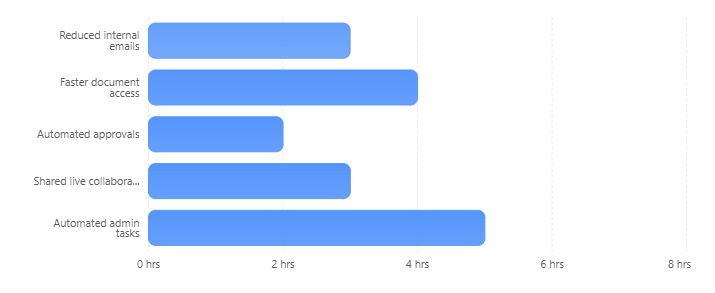
Here is a simple example of how time savings can build up across a business:
Estimated Weekly Time Savings Using Microsoft Tools
Example of how small efficiency improvements can save staff time each week.
Security and efficiency go together
Improving efficiency should never come at the expense of security. Microsoft 365 tools also help businesses work more securely through:
- Secure file sharing
- Multi-factor authentication
- Access controls
- Cloud backups
- Audit trails
- Safer remote working
When configured properly, staff can work flexibly without increasing security risks.
How Maple helps businesses get more from Microsoft 365
Many businesses already have access to these tools but only use a small percentage of their capabilities.
At Maple, we help businesses:
- Set up Microsoft 365 properly
- Organise Teams and SharePoint structures
- Improve collaboration workflows
- Automate repetitive processes
- Secure business data
- Train staff on best practices
- Reduce downtime and inefficiency
The goal is simple: less wasted time, smoother day-to-day operations, and technology that actually supports your business rather than slowing it down.
Maple's thoughts
Efficiency is not just about working faster. It is about removing unnecessary friction so your team can focus on the work that matters most. With the right setup, Microsoft tools can dramatically improve communication, organisation, and productivity across your business, and often, the tools are already there waiting to be used properly.
Signs Your IT Setup Needs an Upgrade